About
About The Game
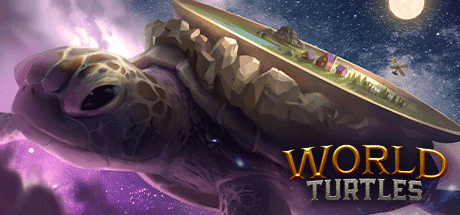
The Turtle beckons! You have been selected by a tribe of peace-loving Meeps to save the life of their World Turtle, a giant space reptile carrying the entire world as they know it on its back. Establish a new way for Meeps to survive and create a sustainable society... All the while feeding the great World Turtle to ensure that it doesn't perish along its endless way.
Cooperation, not conquest, will be necessary for success when the Turtle wanders into the more treacherous stretches of space or - perhaps - meets others of its kind…
Turtling Towards Success ...


System Requirements
Minimum
- Windows
- 操作系统
- Windows 10 64-bit
- 处理器
- Intel Core i5 or equivalent
- 内存
- 2 GB RAM
- 显卡
- NVIDIA® GeForce® GTX 550 or ATI™ Radeon™ HD 6XXX or higher
- DirectX
- Version 11
- 存储空间
- 2 GB available space
- 声卡
- Stereo
- 附注事项
- Minimum requirements may change during development.
- macOS
- 操作系统
- Sierra 10.12+
- 处理器
- x64 architecture with SSE2
- 内存
- 2 GB RAM
- 显卡
- Metal capable Intel and AMD GPUs
- 存储空间
- 2 GB available space
- 声卡
- Stereo
- 附注事项
- Minimum requirements may change during development.
- Linux
- 操作系统
- 64bit Linux
- 处理器
- Dual-Core 2.4 GHz
- 内存
- 2 GB RAM
- 显卡
- NVIDIA® GeForce® GTX 550 or ATI™ Radeon™ HD 6XXX or higher
- 存储空间
- 2 GB available space
- 声卡
- Stereo
- 附注事项
- Minimum requirements may change during development.
Recommended
- Windows
- 操作系统
- Windows 10 64-bit
- 处理器
- Intel Core i7 or equivalent
- 内存
- 4 GB RAM
- 显卡
- NVIDIA® GeForce® GTX 770 or AMD® R9 280
- DirectX
- Version 11
- 存储空间
- 3 GB available space
- 声卡
- Surround Sound
- 附注事项
- Recommended requirements may change during development.
- macOS
- 操作系统
- Sierra 10.12+
- 处理器
- x64 architecture with SSE2
- 内存
- 4 GB RAM
- 显卡
- Metal capable Intel and AMD GPUs
- 存储空间
- 3 GB available space
- 声卡
- Surround Sound
- 附注事项
- Recommended requirements may change during development.
- Linux
- 操作系统
- 64bit Linux
- 处理器
- Dual-Core 2.4 GHz
- 内存
- 4 GB RAM
- 显卡
- NVIDIA® GeForce® GTX 770 or AMD® R9 280
- 存储空间
- 3 GB available space
- 声卡
- Surround Sound
- 附注事项
- Recommended requirements may change during development.
How to activate
- 安装 Steam 并登录你的账户(免费账户即可)。
- 在顶部菜单选择“游戏”→“在 Steam 上激活产品…”。
- 按订单中显示的内容(含连字符)输入密钥并确认。游戏将出现在你的游戏库中。